Rhythm & Pattern Generators · Audio effect
Spindown
A tape-stop effect. The tape slows to a standstill, pitch and time falling together, then spins back up. Trigger it by hand, from held MIDI notes, or on a bar cycle locked to the host.
Opinion
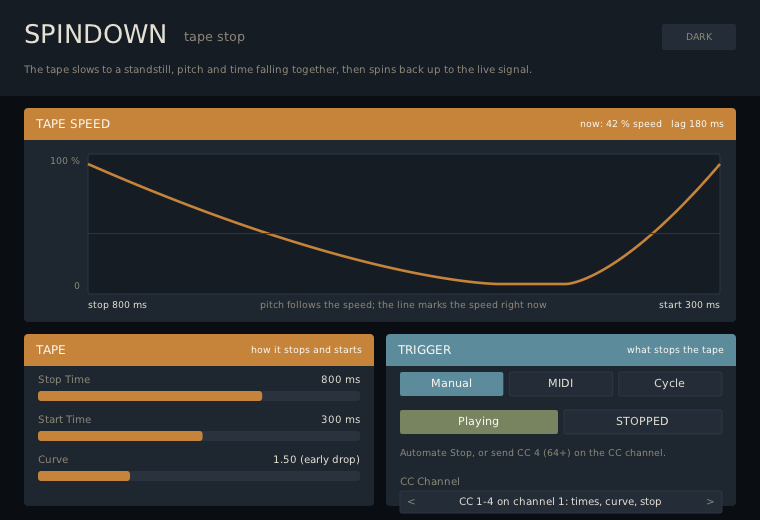
Not yet auditioned in a host. The defaults are an end-of-phrase stop: 800 ms down with a slightly early drop, 300 ms back up. Put it on a drum bus or the master and automate Stop for a classic tape stop, hold a note on a MIDI clip to play it from the piano roll, or set Trigger to Cycle for a stop on the last two beats of every second bar without drawing automation. Shorten Stop Time to 100 ms for a hard brake, or raise Curve for a stop that falls away fast and lingers.
Functionality
The input is recorded into a buffer and played back at the tape speed, so pitch and time fall together as the tape slows. Stop Time is the time from full speed to standstill and Start Time the time back; Curve shapes both (1 is straight, higher drops early). A stop released part-way restarts from the speed reached. When the tape is up to speed again the output crossfades to the live signal, so it never drifts out of time. With the effect idle the output is the input, with no latency.
Trigger: Manual stops the tape with the Stop switch; MIDI stops it while any note is held (release every note to start); Cycle stops it for the last Length beats of every 1, 2, 4 or 8 bars, locked to the host transport (not while the transport is stopped). Controllers on the CC Channel: CC 1 Stop Time, CC 2 Start Time, CC 3 Curve, CC 4 Stop (64 and above), so Drift can play it.
Parameters
| Parameter | Range | Default |
|---|---|---|
| Trigger | Manual, MIDI, Cycle | Manual |
| Stop | Playing, Stopped | Playing |
| Stop Time | 20-4000 ms | 800 ms |
| Start Time | 20-4000 ms | 300 ms |
| Curve | 0.5-4 | 1.5 |
| Cycle | 1, 2, 4, 8 bars | 2 bars |
| Length | 0.25-16 beats | 2 beats |
| CC Channel | off, 1-16 | 1 |
The panel
The plot shows one stop followed by one start with the current Stop Time, Start Time and Curve, and a line marks the tape speed right now; the header gives the speed and the lag behind the live signal. The Trigger panel shows only the controls the chosen trigger uses.
Status
Core covered by tests (85 checks): bit-identical when idle, the speed curve against a brute-force average, the lag at standstill, return to live, interrupted stops, the MIDI trigger, the cycle schedule, CC takeover and bad input. Not yet listened to or validated in a host, and the BBT-to-beat mapping is untested against a real host transport.